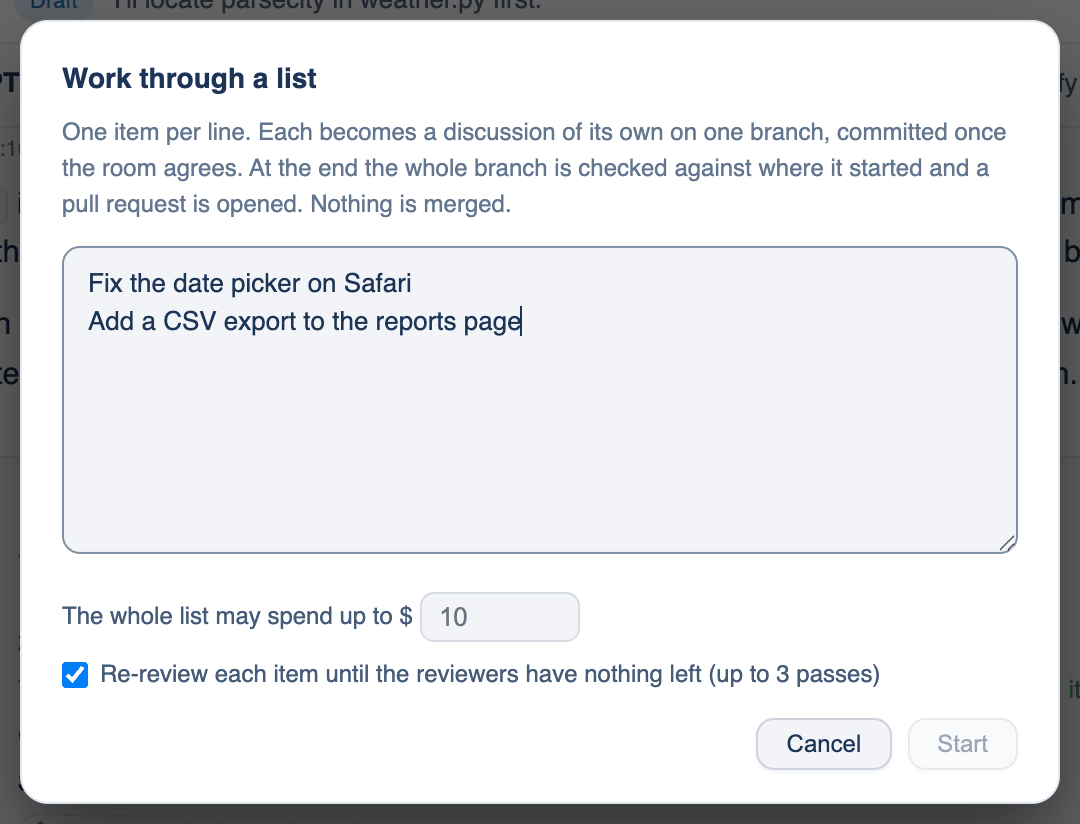
Work through a list takes several pieces of work and runs them one after another, unattended, on one branch. Each item gets its own discussion and a commit once the room agrees. At the end the whole branch is checked against where it started and a pull request is opened. Nothing is merged.
Where to find it. Mac only, in a git repository. Folder chip → Work Through A List…, or type /list. Default: Re-review each item is on.
How to use it
- Open the dialog. Type one item per line, or tick tickets under From the Backlog. Bullets, numbers and task boxes are stripped; a ticked box is left out. Up to 30 items.
- Set The whole list may spend up to $. The run stops when that is spent.
- Leave Re-review each item until the reviewers have nothing left on. After an item's room agrees, anything reviewers left standing goes back as a fix pass and is reviewed again, up to three passes. A team can require this.
- Press Start. The permission mode must be Auto or Bypass; the dialog says so if it is not, because nobody will be there to answer an approval.
What you get back
An item counts as done when the room agreed and something changed. An item the room could not agree on, that failed, or that was stopped is set aside: its work is kept at a git ref the report names, but not mixed into the pull request. A check that was already failing on the base branch is reported as that, not blamed on this branch. The pull request is ready for review when the checks hold, and a draft when they do not.
When to use it. A list of small, independent fixes you would otherwise do one evening at a time.
When not to use it. Items that depend on each other's design, or work you need to steer as it goes. Each item costs a full discussion, so a long list at Deep is expensive.
Split into N
A plan with two or three parts can also fan out at once rather than in sequence: the Do it card's Split into N runs each part in its own worktree and opens a draft pull request for each. Use it when the parts touch different files.
Starting from an issue
/issue 42, an issue link, or Folder chip → Start From A GitHub Issue… starts a discussion from the issue. One cheap call first sorts it as ready (build it), spec (questions to settle first), person (only a person can answer; nothing runs) or parked (not for the room, with a reason). The issue's text is treated as data, never as instructions. The pull request it opens says Fixes #42.
Further reading. SWE-bench, Jimenez et al., 2023. ReAct, Yao et al., 2022.