The Sign-in & Security card lists where the account is signed in and what it has handed out. If a laptop is lost or an address you do not know appears, this is where you end it.
Active sessions
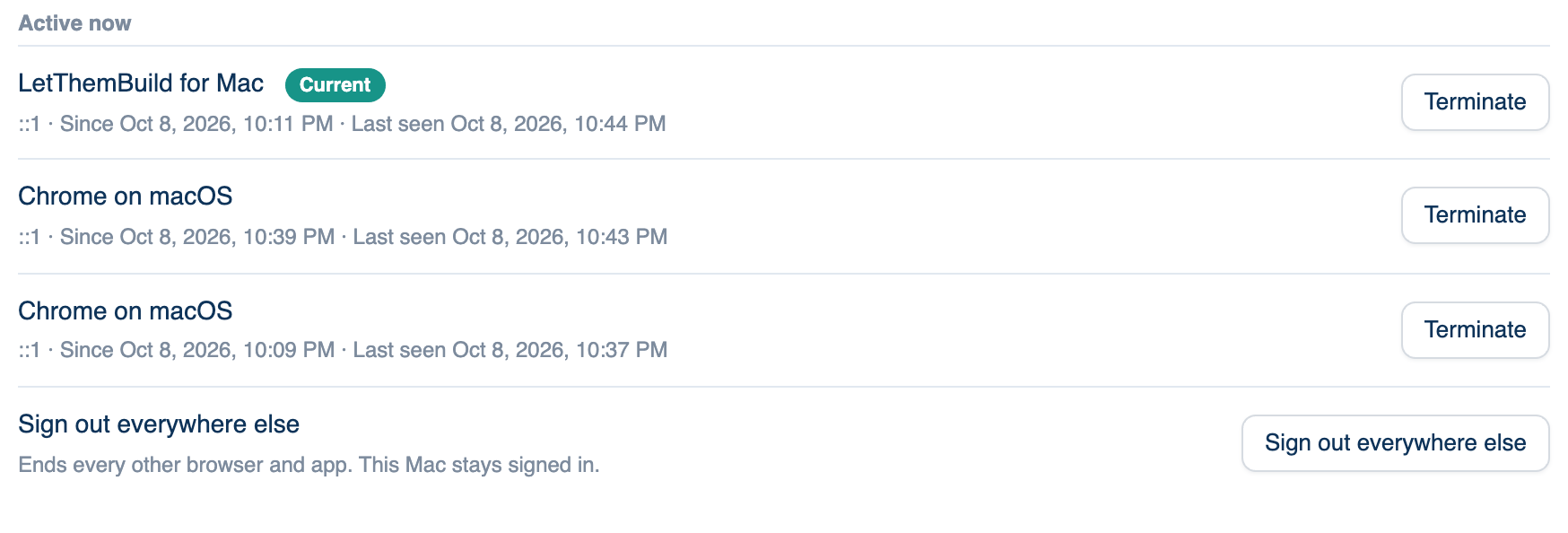
Every browser and app signed in as you, with the device, the IP address it last came from, when it signed in and when it was last seen. The one you are using is marked Current.
Where to find it. Mac: Settings → Account → Account → Sign-in & Security. Web: Settings → Account → Sign-in & Security. iPhone: Settings → Account → Active sessions.
How to use it.
- Read the Active now list. Anything seen in the last day is there; older ones are under Earlier sign-ins.
- Press Terminate beside one you do not recognise, and confirm. It is refused at its next request.
- To keep only the device in your hand, press Sign out everywhere else. It appears when other sessions exist.
When to use it. After using a shared computer, or when a sign-in comes from a place you have not been.
A web sign-in lasts up to 30 days; an app sign-in up to 90.
Standing credentials
A read-only list of every token the account holds: sign-ins, app grants, API keys, provider keys, and the GitHub, Slack, Telegram, Discord and Microsoft Teams links. Each row shows its scope, age, expiry, last use and "Ended by", which names the place that ends it. A long-lived token nobody remembers is how accounts are taken, so read this list now and then. Mac, web, and iPhone under Account → Standing credentials.
Log out of all devices
Ends every session at once: the Mac app, the iPhone app and every browser, including the one you are in. Each has to sign in again. Use it when you think the account itself is compromised. Your discussions are not touched. On iPhone, Sign out next to it signs out only that phone.
Trusted devices
Computers signed in to the desktop app. Your phone and the web can start discussions that run on one of them, in its folder, with its seats. Each row shows the computer's name, version and whether it is online, with Remove. Removing one stops remote runs on it until it signs in again. Mac and web under Sign-in & Security; iPhone under Account → Trusted devices.
Step-up sign-in
A team setting, not yours: when the team's Governance turns on "A fresh sign-in before an admin action", an owner or admin who changes roles, removes a member, mints or revokes a token, edits secrets, single sign-on or the audit outputs, pauses the team or deletes it, must have signed in within the team's window (15 minutes unless the owner chose 5 to 240). Otherwise the action is refused with Sign in again to confirm it is you. It repeats the sign-in you already use; it is not a separate second factor.
Further reading.
- NIST SP 800-63-4 Digital Identity Guidelines — NIST, 2025.
- Web Authentication Level 3 — W3C, the standard behind passkeys.
- RFC 6238 TOTP — IETF, 2011, the authenticator-app codes your sign-in provider may use.