LetThemBuild has a few moving parts. Knowing where each one runs explains most of its behaviour, including why some things work only on the Mac.
Your devices and your account
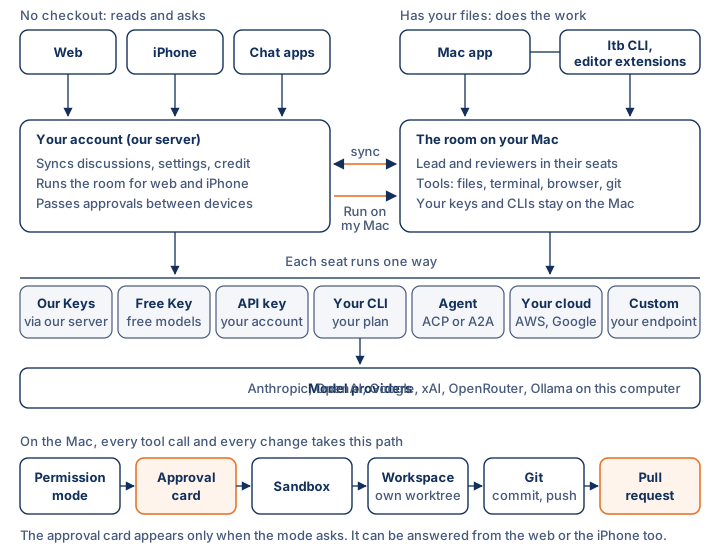
You reach the room from a browser at letthemchat.com, the iPhone app, the Mac app, the ltb command line, the editor extensions, or a chat app such as Slack. Every one of them signs in to the same account on our server. The server keeps your discussions, settings, projects, tickets and credit in step across devices, and it passes approval requests between them. If a run on your Mac needs approval, you can answer from your phone.
Where the room runs
The room is the lead and its reviewers working through one question. It runs in one of two places.
- On your Mac, for discussions started in the Mac app, the command line or an editor. This room can work with your files: it reads and writes in your workspace, runs your build and tests, uses a browser and works with git. API keys and CLIs you set up on the Mac are used there and are not sent to our server.
- On our server, for discussions started on the web or the iPhone. This room can search, fetch pages, read attachments and write documents, but it has no copy of your code.
Run on my Mac connects the two. You start a discussion on the web or the iPhone and send it to your Mac, which runs it with its own seats and its own checkout. The Mac has to be awake, signed in and connected.
How a seat reaches a model
Each seat runs one way, and you choose that way per seat. Our Keys goes through our server and is paid from your credit. Free Key uses free models. Your API Key and Custom call a provider or your own endpoint on your account. Your CLI borrows a coding assistant's CLI that you have already signed in to. An agent connects over ACP or A2A. Your Cloud goes through your Amazon Bedrock or Google Vertex account. Several of these need a paid plan once the trial ends. How a seat runs explains which.
One question, start to finish
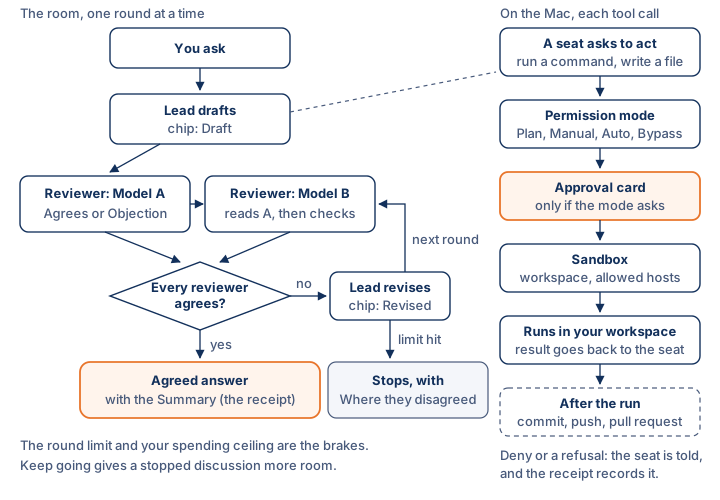
The lead drafts an answer. Each reviewer reads everything said before it in the round and replies Agrees or Objection. While "Have the AIs rank each other" is on, the seats see each other as Model A and Model B and never by name. If anyone objects, the lead revises and the reviewers check again. The room stops when every reviewer agrees, when it reaches the round limit, or when it hits a spending ceiling. If it stopped without agreement, the answer says where the seats disagreed instead of glossing over it.
On the Mac: from a tool call to a pull request
Every time a seat on the Mac wants to act, such as running a command or writing a file, the request goes through the same checks in order. First the permission mode decides whether the room needs to ask. If it does, you get an approval card. If the action is allowed, it runs inside the sandbox, which limits what it can touch. Only then does it run, in the workspace, which is usually the discussion's own worktree. When the run is over, the git button takes the branch through commit and push to a pull request. Each step is recorded on the Summary, including anything that was refused.