The foot of the Configure panel is where you find out whether a seat works and fix it when it does not.
Test
Sends a short request through the seat as it is set up now and reports the result under the buttons: "Connection works" or the provider's error in plain words. A failed test turns the seat's dot amber ("Last test failed") until the next one passes.
Where to find it. Configure seat → Test on the Mac, Test connection on the web and iPhone, shown once the seat is connected or on Our Keys. Test all in the seat dock checks every seat at once.
When to use it. After pasting a key, after signing a CLI in, and whenever a seat goes quiet in a discussion.
Disconnect
Removes the seat's connection: its key, sign-in or endpoint. The seat keeps its place and its models and shows Not connected.
Where to find it. Configure seat → Disconnect, in red, when the seat is connected. On Mac, web and iPhone.
When not to use it. To keep a seat out for a while, switch it off instead; Disconnect means setting it up again.
Add credit
A link to Plan & Billing, shown on Our Keys seats. It is hidden in the Android app.
Several accounts per CLI
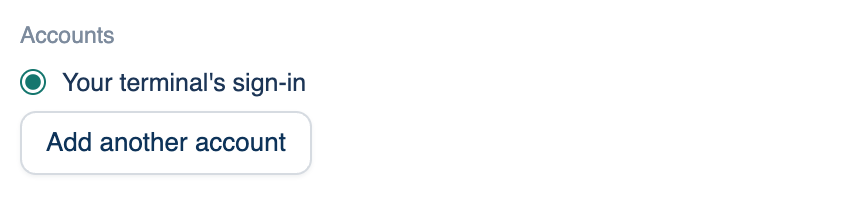
A Claude Code or Codex seat can hold more than one sign-in. The list starts with your terminal's own sign-in; Add another account asks what to call it (work, second plan), makes a separate folder for it and types the sign-in command into the Terminal pane for you to run. Up to five extra accounts per CLI.
Where to find it. Mac: Configure seat on a Your CLI seat → Accounts. Pick the one the seat uses with its radio button; Remove drops an added one.
How to use it.
- Press Add another account and give it a name.
- Finish the sign-in in the Terminal pane.
- Leave your main account chosen; the others are spares.
What changes. When the account in use hits its usage limit, the row says until when, and the seat carries on with the next account before anything is spent on our keys. Settings, skills and commands are shared between accounts; each keeps its own sign-in. A team can require CLI seats to use team accounts only.
When not to use it. Check your provider's terms before rotating several personal plans through one seat.
The role a seat reviews as
Reviewer roles narrow what a seat looks for when it reviews: security, tests, accessibility. They are created and assigned in the Review Policy card, not in this panel, so that the four seats share one list.