The app has five ways to tell you something: notices inside the app, system notifications, mail, Slack, and the Inbox. Each has its own switch, and they differ by platform.
Notices in the corner
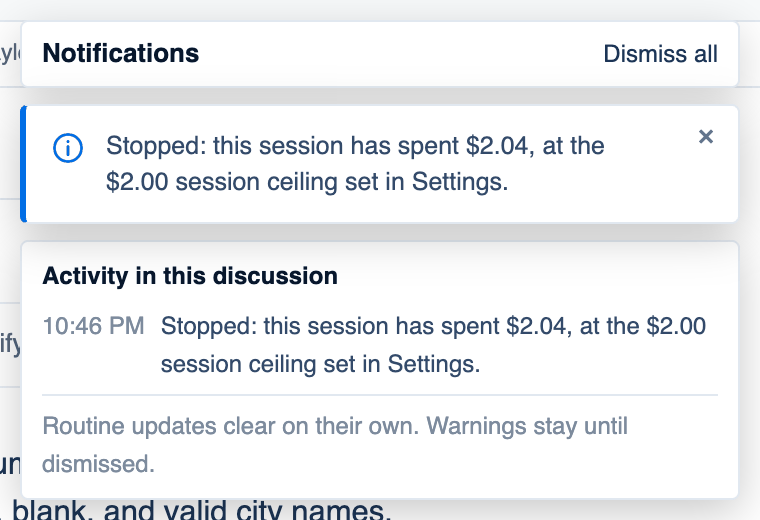
A notice is a card about a run in front of you: a ceiling reached, a seat that went quiet, a retry, a cost higher than usual. Routine notices clear on their own; warnings stay until you close them with the cross.
- Mac. Cards stack at the top right of the discussion. The Notifications bell in the title bar shows how many are open, and opens Activity in this discussion, a timed history of every notice in this discussion, including those already cleared.
- Web. The same stack, with Dismiss all once there are two. No bell or history.
- iPhone. One card at a time at the top right.
Where to find it. Mac: Settings → This Mac → Appearance → Display → Show notices in the corner. Web: Settings → Appearance → Notifications. iPhone: Settings → Notifications → In a discussion. Default: on everywhere. Off puts each notice in a line above the composer, which is easier to miss.
When a discussion finishes
| Platform | Setting | Default | What it covers |
|---|---|---|---|
| Mac | Appearance → Notifications → Notify me when a discussion finishes | On | A system notification |
| Web | Appearance → Notifications → Notify me when a discussion finishes | On | A browser notification while the page is open in some tab; asks the browser's permission the first time |
| iPhone | Notifications → When a discussion finishes | On | A banner while the app is running in the background |
| iPhone | Notifications → When your Mac needs an answer | On | A banner when a Mac run waits for your approval |
There is no remote push. A closed browser tab, or an iPhone app the system has shut, is not told. While a run is going on the web, Tell me when it's done asks for the browser's permission there and then.
Cost notices
Ask when a discussion costs more than usual raises a notice with Stop and Keep going when a discussion passes two, three or five times your usual cost. Usual is the median of your last 40 priced discussions, and it only asks once a discussion passes 25 cents, and only while you are there. Default: on, at 3×. Mac: Appearance → Notifications. Web: Spending → Brakes, which sets it for runs on your Mac.
Mail and Slack
- Mail me when a day's spend spikes (web: Spending, under your own usage; default on): once a day, when today is three times a usual day.
- Budget alerts: a team member with a budget, and the owner, get mail at 80% and 100% of it.
- A team's Daily digest in Slack, set under Team → Integrations.
Inbox
Tickets assigned to you and comments on yours, on every platform, with an unread count in the sidebar or drawer.
When not to rely on any of these. For a run that must not sit waiting overnight. Set a ceiling under Spending → Brakes and an approval wait on the Mac instead.
Further reading. Understanding SC 4.1.3 Status Messages and Understanding SC 2.2.4 Interruptions, W3C WAI.