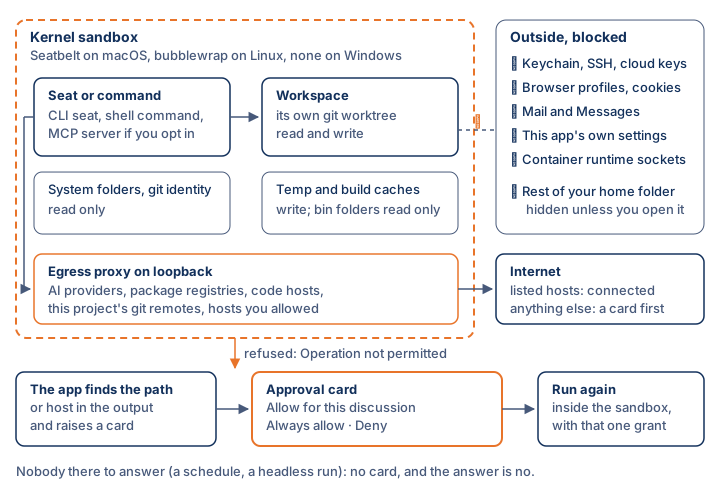
The room's own file tools already refuse to write outside the workspace or open a credential file. A command-line seat (Claude Code, Codex, Gemini CLI, Grok) and any shell command a seat runs never pass through those checks, so the operating system holds them instead. That is the sandbox. It applies whichever AI is running, and it is on by default.
Which sandbox you get
| Platform | What holds commands |
|---|---|
| macOS | Seatbelt, which ships with the system. Nothing to install. |
| Linux | bubblewrap (bwrap), which you install from your distribution. Without it there is no kernel sandbox. |
| Windows | Nothing at the kernel level. The app's own checks are all there is: its file tools refuse out-of-workspace writes and credential reads, but a command, or a CLI seat's own tools, can reach whatever your Windows account can. |
The first line of the In force now card, at the top of Settings → Workspace → Privacy & Security, says which one this machine has. The web and iPhone have no sandbox because they run no shell: the server room's tools fetch, search, publish and draw, and none of them touches a file system. A discussion set to Run on my Mac runs under the Mac's sandbox.

What a sandboxed seat can reach
- Write: the workspace (in a worktree, that worktree plus the parts of the main repository's .git it needs), temp folders, build and tool caches such as ~/.npm, ~/.cargo, ~/Library/Caches and ~/Library/Developer, and the seat's own CLI folder. The runnable parts inside those caches (bin folders, shell start-up files, pip and cargo config) are read-only, so a seat cannot plant code that later runs outside the sandbox.
- Read: the workspace, system folders, your git identity, shell start-up files, and files you pasted into the composer.
- Hidden: the rest of your home folder. Documents, Desktop and your other projects do not exist as far as the command can tell.
- Network: loopback, plus the app's egress proxy, which forwards only to hosts on its list.
Always denied
While the sandbox is on, these are never readable, whatever else you switch off: SSH, AWS, gcloud, Azure, kube and Docker keys; .netrc, .npmrc and .pypirc; the gh and glab sign-ins; password stores; shell histories; browser profiles and cookies; Safari, Mail and Messages; this app's settings; and the other CLIs' sign-ins. A deny wins over any allow. Docker, Podman and Colima sockets are refused too, because a container runtime can mount any folder.
Reviewers get less
A reviewer only checks the lead's work. It runs read-only (Claude Code in plan mode with Edit and Write denied, Codex read-only, Gemini in plan mode) and gets neither the keychain nor any ssh, gpg or 1Password agent socket. On Linux each run also gets its own process namespace, so it cannot read another process's environment.
When there is no sandbox
The sandbox is not required by default. Where none can be had, commands run without one and Settings says so. Switch on Refuse tools without the kernel sandbox in the Guardrails list and it fails closed instead: commands are refused, CLI seats are not started, and worktree setup commands are skipped. A closed network whose proxy is not running has no way out at all, and the run is told to reopen the app.
Further reading. The Protection of Information in Computer Systems — Saltzer and Schroeder, 1975. App Sandbox — Apple. Capsicum: practical capabilities for UNIX — Watson et al., 2010.