A skill is a set of instructions with a name. Start a message with /name and the skill travels with it, visibly. The models can also pick one up on their own when it fits. A skill is a file: name.md, or a folder holding SKILL.md and what it needs beside it, such as a script or a template. Its description: line says when to use it; that line is what every seat sees, and how it knows to reach for the skill unasked. Nothing a skill brings is made runnable on arrival. If it names a script, a model has to ask to run it, and that goes through the usual approval.
On the Mac your skills are files in the app's skills folder, usable in every workspace; a repository can keep its own in .letthemchat/skills, which win on a name clash there. On the web and the iPhone a skill is saved to your account.
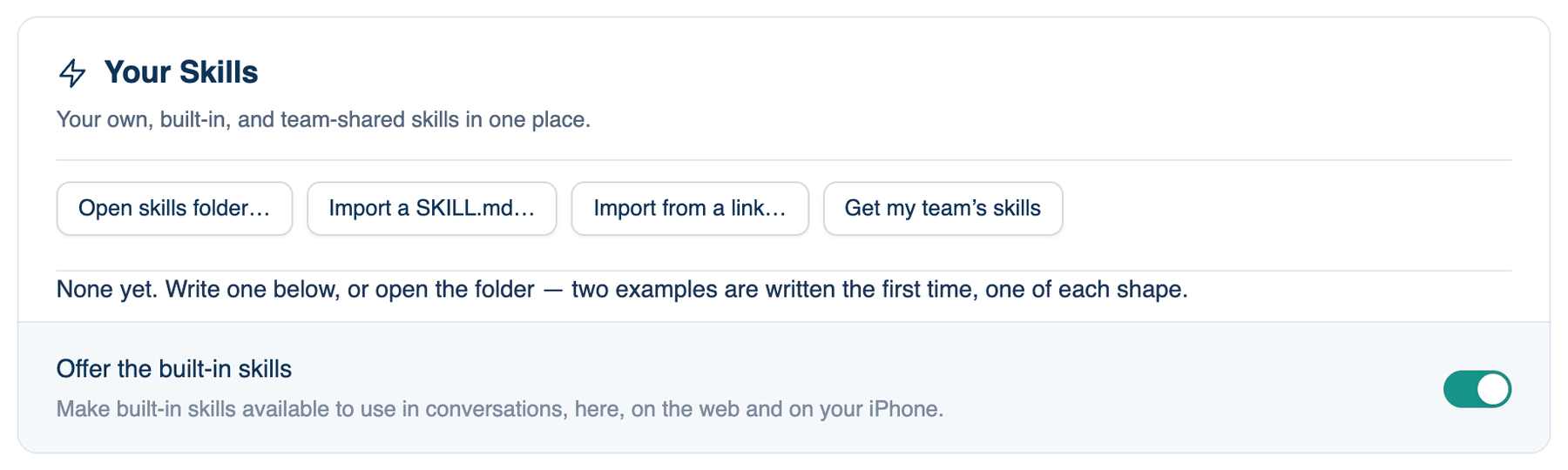
Your Skills
Where to find it. Mac: Settings → The room → Skills → Your Skills. Web: Settings → Skills. iPhone: Settings → The Room → Skills.
| Button | What it does |
|---|---|
| Open skills folder… | Opens the folder (Mac). The first time, two examples are written, one of each shape |
| Import a SKILL.md… | Picks a .md file (Mac, web) |
| Import from a link… | A raw .md address, a GitHub folder, or a gist (Mac) |
| Get my team's skills | Copies your account's skills and your team's shared ones onto this Mac, into a separate folder, so nothing you wrote is overwritten |
Each row shows /name, a tag (Built-in, Personal, Team shared, Project, From the registry), the description and where it applies. A built-in has Customise, which copies it into Write a Skill as your own; yours then wins and the app stops updating it. Your own skills have Share with my team (then ✓ Shared with team), Edit and Delete. Someone else's shared skill and a project's skill have none: change a project skill in its repository. On the iPhone, tap a skill to edit it, swipe left to delete and swipe right to share or stop sharing.
| Setting | Default | What it does | Change it when |
|---|---|---|---|
| Offer the built-in skills | On, shared across apps | Makes /deck, /ship-check and /explain available | You want only your own in the / menu |
Your Team's Registry
Shown only when a team owner or admin sets a skill registry address in the team's Governance policies. It lists the skills your team serves from one file, each with Install, or Update when you already have it. Installing makes the skill your own.
Write a Skill
How to use it.
- Type a Skill name, short, with hyphens between words. It becomes the /command.
- In Instructions, start with a one-line description, then the steps the room should follow.
- Press Save skill. The Mac saves it to your skills folder; the web saves it to your account, for the web and the phone. On the iPhone, + at the top opens the same editor.
When to use it. A procedure you repeat by name: release notes, a migration checklist.
When not to use it. Rules for every turn belong in the Model Prompt Editor, and facts in Memory. A skill imported from a link is someone else's instructions to your models; read it before you use it.
Reports (iPhone)
On the iPhone, The Room ends with Reports. It lists your reports with their titles, how many rows are closed and the date. Tap one to open it in Safari, or swipe to share it. A report is made from an agreed answer that contains a table, with that answer's Report button.
Further reading. LLM01:2025 Prompt Injection — OWASP GenAI Security Project, 2025.