LetThemBuild puts several AI models in one room. One leads, the others review its work, and you get one agreed answer with a record of what was checked. Use it in a browser, on an iPhone, or on a Mac, where the room also works in a real folder.
Pick where you start
| You have | Do this | It worked when |
|---|---|---|
| A browser | Go to letthemchat.com and sign in with Apple, Google, Microsoft or your work email. | An empty discussion, composer at the bottom. |
| A Mac | Download LetThemBuild from letthembuild.com/download, open it and press Sign in. Your browser opens letthemchat.com; sign in there and return to the app. | The window shows a short checklist headed "A few things, then you're set". |
| An iPhone | Install LetThemChat from the App Store (the link is on the same download page) and sign in. | Your discussions list, empty at first. |
It is one account everywhere, and a discussion started on one device appears on the others. Windows and Linux builds are on the download page too.
What is already set for you
- Credit. A new account comes with $2 of credit on Our Keys, and you don't need a card. All four seats run on Our Keys until you change them, so your first question needs no API key.
- Permission mode is Auto on the Mac. The room works without asking and stops to ask before a command it counts as dangerous.
- The sandbox is on on the Mac. Commands and CLI seats can write to the workspace, the temp folders and the build caches, and that is all. The rest of your home folder is hidden from them, and the network is closed apart from the hosts the room needs.
- Each discussion in a git repository gets its own worktree, so the room's edits stay on a separate branch until you decide what to do with them.
No spending ceiling is set. On Our Keys your credit is the outer limit. If you plan to run long discussions, set a ceiling under Settings → Spending first.
Your first five minutes
- In the composer, ask something that has a checkable answer and room to disagree. For example: "Is it safe to keep a login session token in the browser's localStorage? Answer yes or no first, then explain." Press Return.
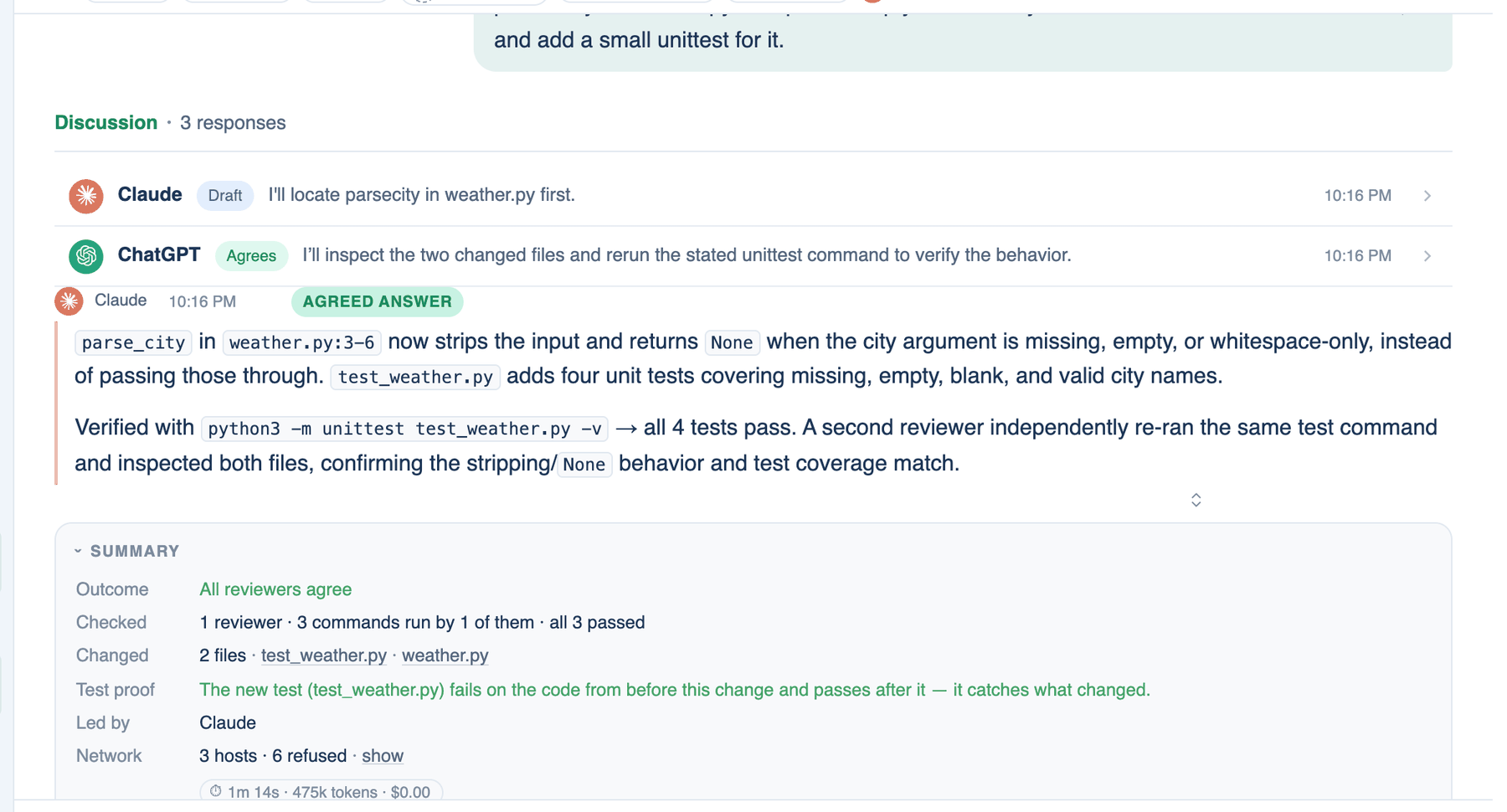
- Watch the lead's turn appear with a Draft chip. Then each reviewer answers, in turn, with Agrees or Objection. An objection sends the lead back for a revision, which is marked Revised.
- When every reviewer agrees, the last turn is marked Agreed answer and a Summary card follows it: the outcome, who agreed, what ran, and what the run cost.
- Read the Summary before the answer, because it tells you how much checking stands behind it.
If the room hits its round limit without agreeing, the write-up ends with a "Where they disagreed" section and a button that gives it more rounds. That is still a useful result.
I want to…
| Goal | Read |
|---|---|
| Have the room change code and open a pull request | Quick start on the Mac |
| Understand how the pieces connect | How it fits together |
| Look up a word the app uses | Glossary |
| Choose which model sits in each seat | Seats in Settings, and Configure a seat |
| Use my own API key or a CLI I already pay for | How a seat runs |
| Cap what a discussion can spend | Spending brakes |
| Control what the room may do on my Mac | Permission modes, Approvals, Sandbox |
| Start work from my phone that runs on my Mac | Run on my Mac |
| Ask from Slack or another chat app | Chat apps |