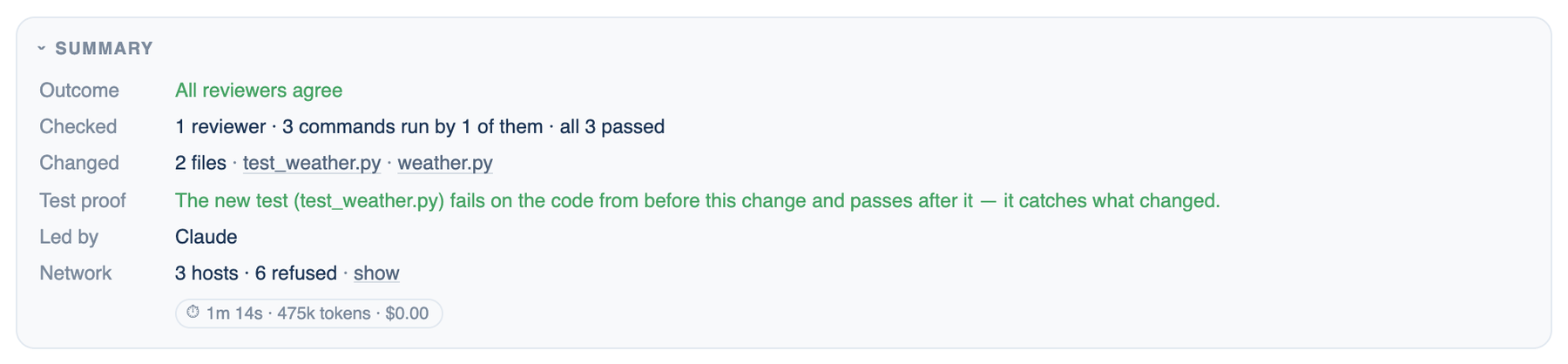
Every finished run ends with a Summary card in the transcript. It is the receipt for that run: what was decided, what was checked, and what it cost. Earlier runs keep a smaller version under their last reply, folded by default (Settings → Appearance → Display → Fold earlier run summaries).
The rows
| Row | What it says |
|---|---|
| Outcome | The agreement signal, for example All reviewers agree · 3 of 3, or Answered by one seat alone |
| Why, Blocked | On a failed run: the seat, the tool call, the cause, and the steps that will not run because of it |
| Checked | How many reviewers ran commands, how many passed, and anything caught and fixed along the way |
| Changed | The files changed; click one to open its diff |
| Authored | Which seat wrote which lines |
| Tools, Handed over, Forbidden | What the run used and what it refused |
Verified and the other grades
On the Mac, the receipt line under a reviewed answer starts with a grade: Verified (every reviewer ran a check and all passed), Partly verified, Checks failed, Not visible (every reviewer worked in its own CLI), Reviewed (nothing changed, so there was nothing to check) or Unverified. Hover the grade for the reason.
Still true?
Where to find it. Mac only: the Still true? button at the end of a receipt whose reviewers ran commands.
How to use it.
- Open an older discussion and find its receipt.
- Click Still true?. The reviewers' own commands run again in the workspace.
- The button changes to Still true, or to how many checks no longer pass.
When to use it. Before you build on an answer from last week, or after someone else merged into the branch.
When not to use it. When the workspace has moved to a different branch on purpose: the checks run against what is there now.
Timing pill and run map
Under the card, a pill reads like ⏱ 1m 12s · 34k tokens · and the cost in dollars. Click it for where the time and money went per seat, the blind peer ranking, and on the web a run map showing seats, tools and connected servers with the calls between them. The ranking is each seat ranking the others' positions without knowing whose they are; switch it off in Settings → Who's In The Room → Discussion Behaviour → Have the AIs rank each other.
Further reading. Chain-of-Verification Reduces Hallucination, Dhuliawala et al., 2023. Judging LLM-as-a-Judge with MT-Bench and Chatbot Arena, Zheng et al., 2023.