The mode decides what the lead may do without asking you. It is the Permission chip under the composer, and the slash commands such as /manual, /edits and /bypass set it too. Whatever the mode, the sandbox still holds.
The modes, in menu order
- Manual: asks before every file change and every command.
- Accept edits: file changes go through; commands still ask.
- Smart: file changes go through, and a fast model judges everything else (see below).
- Plan: discussion only. No tools run.
- Auto: the default. Writes in the workspace and ordinary commands run; dangerous ones ask.
- Bypass: never asks. Use it only in a throwaway workspace. The chip turns amber while it is on.
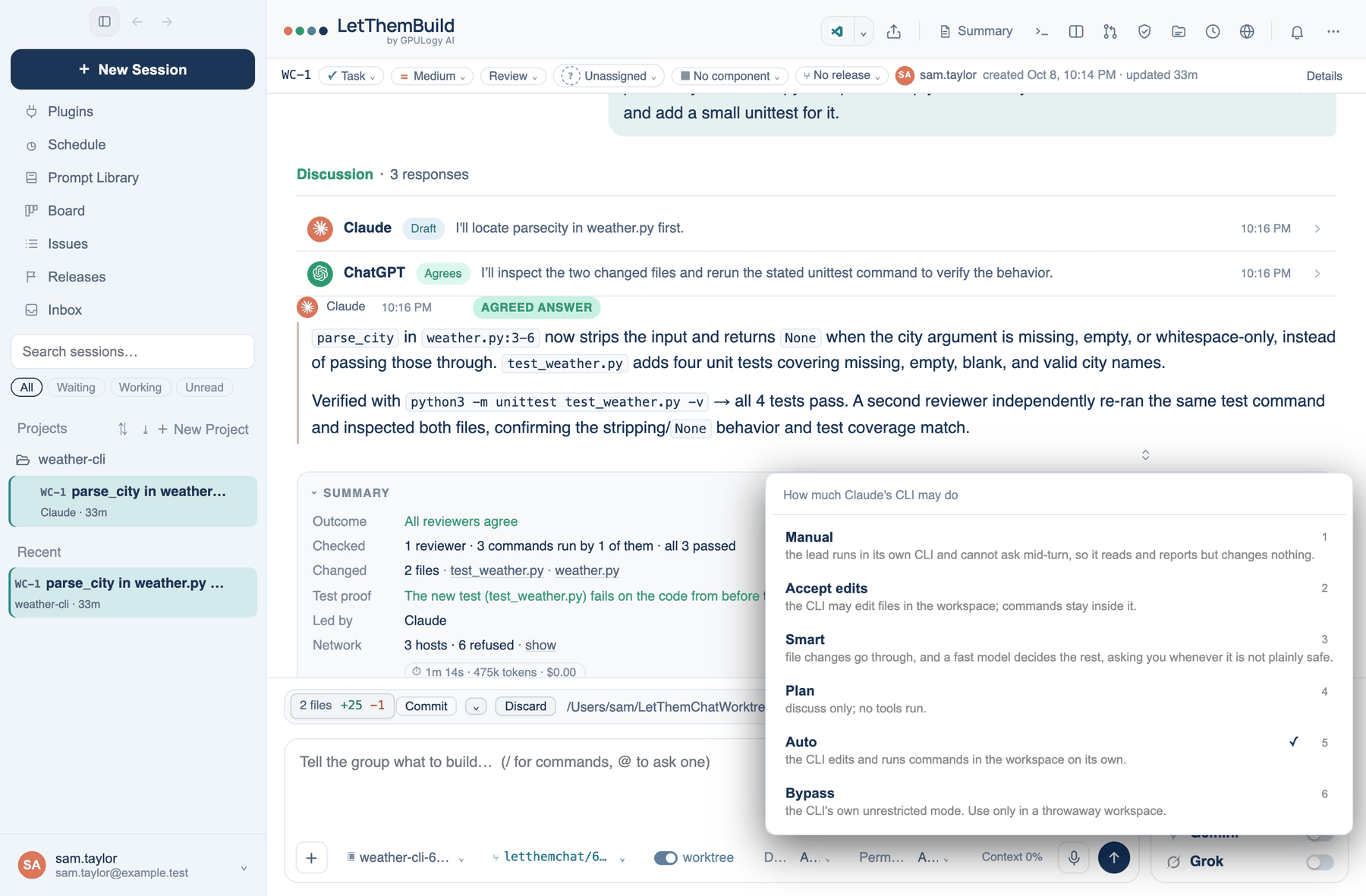
A lead running in its own command-line tool cannot stop mid-turn to ask you, so the app passes the nearest mode that CLI has. Manual and Plan become its read-only or plan mode, Accept edits its edit mode, Auto its automatic mode, and Bypass its unrestricted mode. Smart has no CLI equivalent, and a CLI lead in Smart runs read-only.
A team can set a mode floor in Governance, so members cannot choose anything looser than, say, Smart.
Smart and its judge
In Smart, edits go through and every other call goes to a fast model with one question: allow, or ask. Anything short of a clear allow (a refusal, a timeout, no key for the judge) comes to you as a card. A dangerous command is never allowed by the judge, and Smart never answers for you when nobody is there. The judge is told that the action it reads is data, never an instruction. You can switch Smart on from the Guardrails list as Let a model decide the rest.
Dangerous commands
In Auto these still ask: sudo and su; rm -rf on /, ~ or a wildcard; find -delete; shutdown, reboot, diskutil, launchctl, crontab and killall; chmod or chown on / or ~; keychain commands; git push, npm publish and flyctl deploy; ssh, scp, sftp, rsync to a host, nc and telnet; curl or wget sending a body, or a script piped from the network into a shell; any command that names a credential store; and anything touching the installed app. This list catches commands that say what they do. It is not a wall, and a command that disguises itself can pass it. The sandbox is the wall.
What Auto still asks about
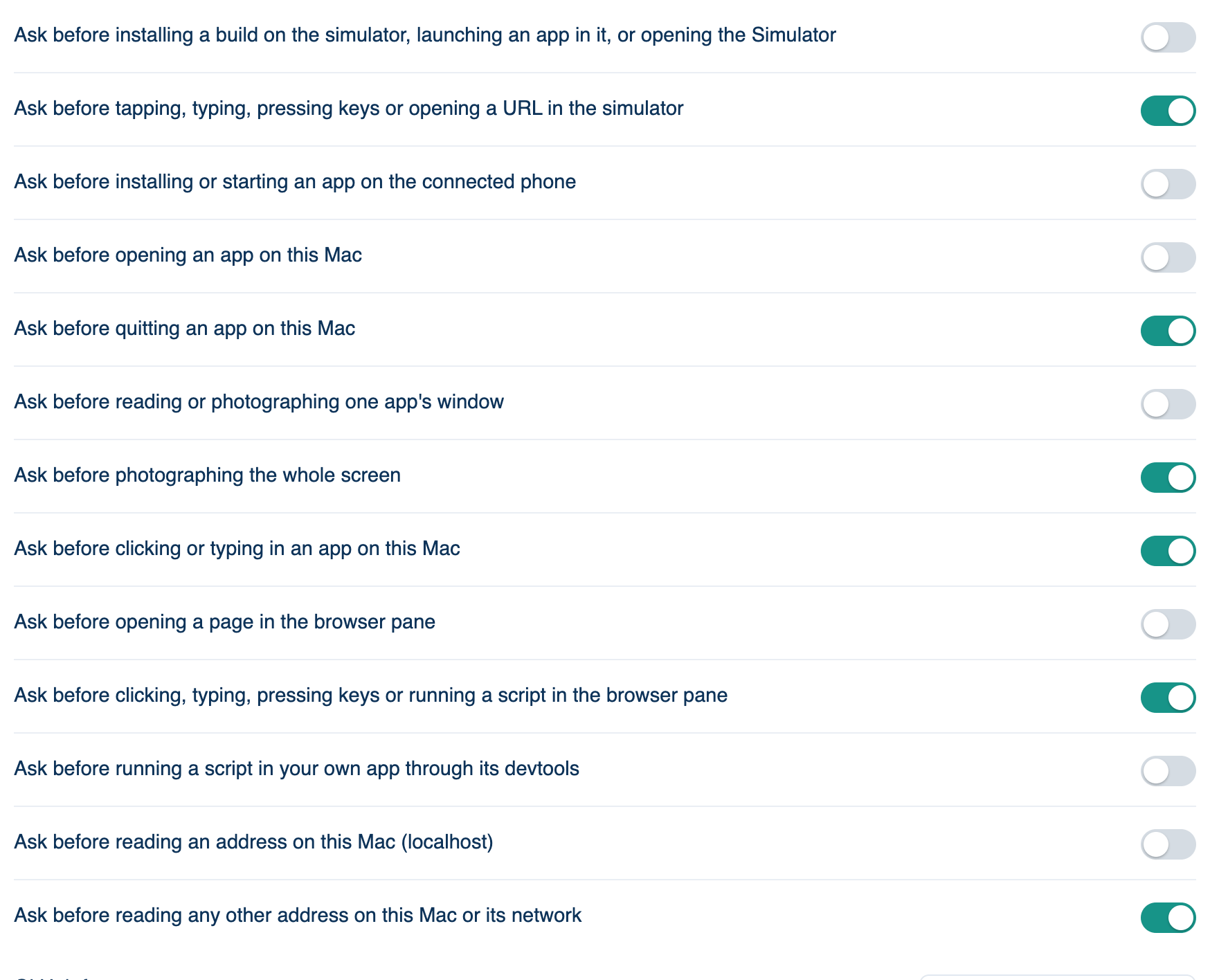
Mac only: Settings → Account → Sign-in & Security → What Auto still asks about. Each switch reads "Ask before …".
| Ask before | Default |
|---|---|
| installing a build on the simulator, launching an app in it, or opening the Simulator | Off |
| tapping, typing, pressing keys or opening a URL in the simulator | On |
| installing or starting an app on the connected phone | Off |
| opening an app on this Mac | Off |
| quitting an app on this Mac | On |
| reading or photographing one app's window | Off |
| photographing the whole screen | On |
| clicking or typing in an app on this Mac | On |
| opening a page in the browser pane | Off |
| clicking, typing, pressing keys or running a script in the browser pane | On |
| running a script in your own app through its devtools | Off |
| reading an address on this Mac (localhost) | Off |
| reading any other address on this Mac or its network | On |
The ones on by default act where your logins are, photograph everything, or reach your network. Whatever you set here, a dangerous command, work outside the workspace, a sandbox refusal, mail or a payment, a merge and a schedule ask in every mode except Bypass.
Further reading. LLM06:2025 Excessive Agency — OWASP, 2025.