The right half of the composer row decides what your next message costs and how much the room may do without asking. Under the box sits the seat dock.
Depth
Where to find it. Mac and web: the Depth chip in the composer row. iPhone: ⋯ → Depth. It applies to this discussion.
How to use it.
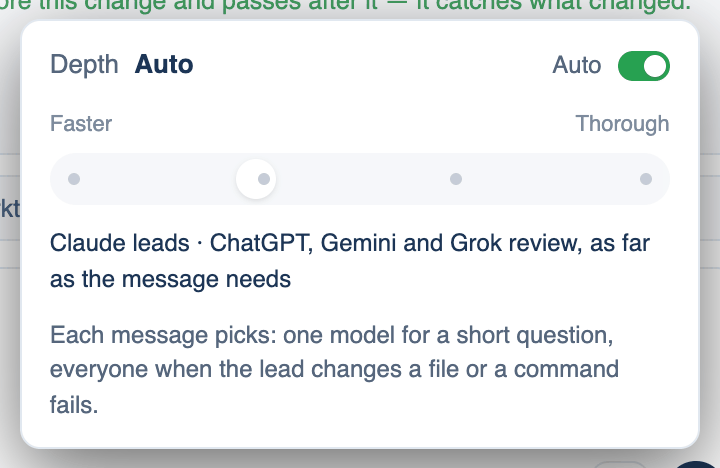
- Click Depth. At the top is an Auto switch; under it a slider from Faster to Thorough.
- Pick a stop: Quick (one model, one pass), Compare (two models, one checking the other), Consensus (everyone, two rounds), or Deep (everyone, four rounds).
- The menu shows who that brings in and how many calls a turn makes.
With Auto on, each message picks: one model for a short question, everyone the moment the lead changes a file or a command fails. Depth is covered in full on its own page.
Permission
The Permission chip (Mac) sets how much the lead may do without asking: Manual, Accept edits, Smart, Plan, Auto or Bypass. Auto is the default. When the lead is a command-line tool the wording changes, because a CLI cannot stop mid-turn to ask. The modes have their own page.
Do it and Split into
After a run in Plan mode, a card offers the plan as a prompt with Do it, which sends it as your message, and Not now. When the plan has two or three separate parts, Split into N runs each part as its own discussion in its own worktree, at the same time, and each opens a draft pull request when its reviewers agree. Splitting costs roughly N times as much.
Context meter, dictation, Send and Stop
Context N% shows how much of the leader's window the discussion is using; on the iPhone it turns orange from 80%. Hold to dictate (the mic) records while you hold it, so there is no recording left running by mistake. The web has Voice mode instead, which reads replies aloud and listens again; the iPhone has both. Stop ends the run and keeps what was said.
The seat dock and @mentions
Under the composer is one tile per seat. Click a tile to leave that seat out of this discussion or bring it back. The bar above the tiles, Models and who leads, opens a table: Seat, Agent, Lead, Model, Effort and Speed, with Test all. Changes here apply to this discussion's own room.
Start a message with @claude, @chatgpt, @gemini, @grok or the seat's model handle to ask that seat alone: one pass, no review. Say "everyone" to ask the room. @guest opens the model catalogue so any model can answer once; a guest never counts toward agreement and is billed from your credit.
When not to use it. An @mention skips the review, so do not use it for a change you need checked.