Every seat runs one way at a time, chosen under Runs On in its Configure panel. The Mac lists eight, in this order. The web and iPhone set up the first four that do not need a computer (Our Keys, Free Key, Your API Key, Custom); the rest are Mac-only, though a discussion run on your Mac uses them wherever you started it.
| Way | Who pays | Through our servers, run on the Mac |
|---|---|---|
| Our Keys | Your credit | Yes |
| Free Key | Nobody, within limits | Our free key: yes. Your free account or Ollama: no |
| Your CLI | Your CLI subscription | No |
| Your API Key | The provider, on your key | No |
| Custom | Your endpoint | No |
| ACP Agent | The agent's own sign-in | No |
| A2A Agent | The agent's owner | No |
| Your Cloud | Your Bedrock or Vertex account | No |
A turn run on the web or iPhone is always made from our servers, whichever way the seat runs; a key you saved there is kept encrypted and used only for your turns.
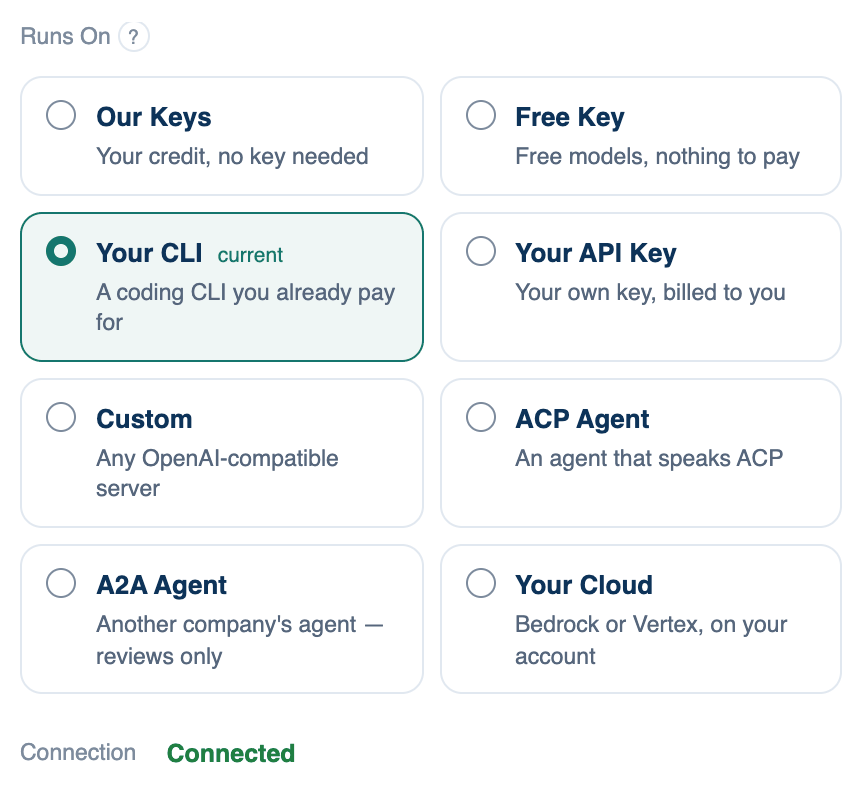
Which ways your plan allows
Our Keys and Free Key are open on every plan. Every bring-your-own way (Your CLI, Your API Key, Custom, ACP Agent, A2A Agent, Your Cloud, and a free account of your own under Free Key) is open on the Free plan for one 14-day trial per account and device, then needs Pro or Team. A locked card says why and shows a Pro tag. Choosing one on Free may start the trial; the "?" beside Runs On shows when it ends.
Our Keys
Runs on our provider keys and draws down your credit. Nothing to configure.
Where to find it. Configure seat → Runs On → Our Keys, on Mac, web and iPhone. Default for a new account.
When to use it. To start, and for any model in the catalogue you have no account with.
When not to use it. When your prompts and files must not pass through a third party: with Our Keys they go to the provider through our servers. A seat with no credit left stops, and Who's In The Room shows a Top up link.
Free Key
Free models, three ways. Choose Free Key, then one of the options under it:
- Included Access uses free models on our key, with a daily allowance and a meter showing what is left and when it resets. A free account has it for 14 days; paid plans keep it.
- Free Provider Key uses your own free account at Groq, Google AI Studio, Cerebras, OpenRouter or Mistral. For providers that train on what you send, you must tick a consent box before the key field opens.
- Local Model runs a model in Ollama on your Mac. No limit but the machine, and nothing leaves it. The web and iPhone cannot reach it; Run on my Mac can.
When not to use it. For code you care about. Free models are smaller, some have no tools, and two of the providers train on your prompts.